Smart Marks Entry
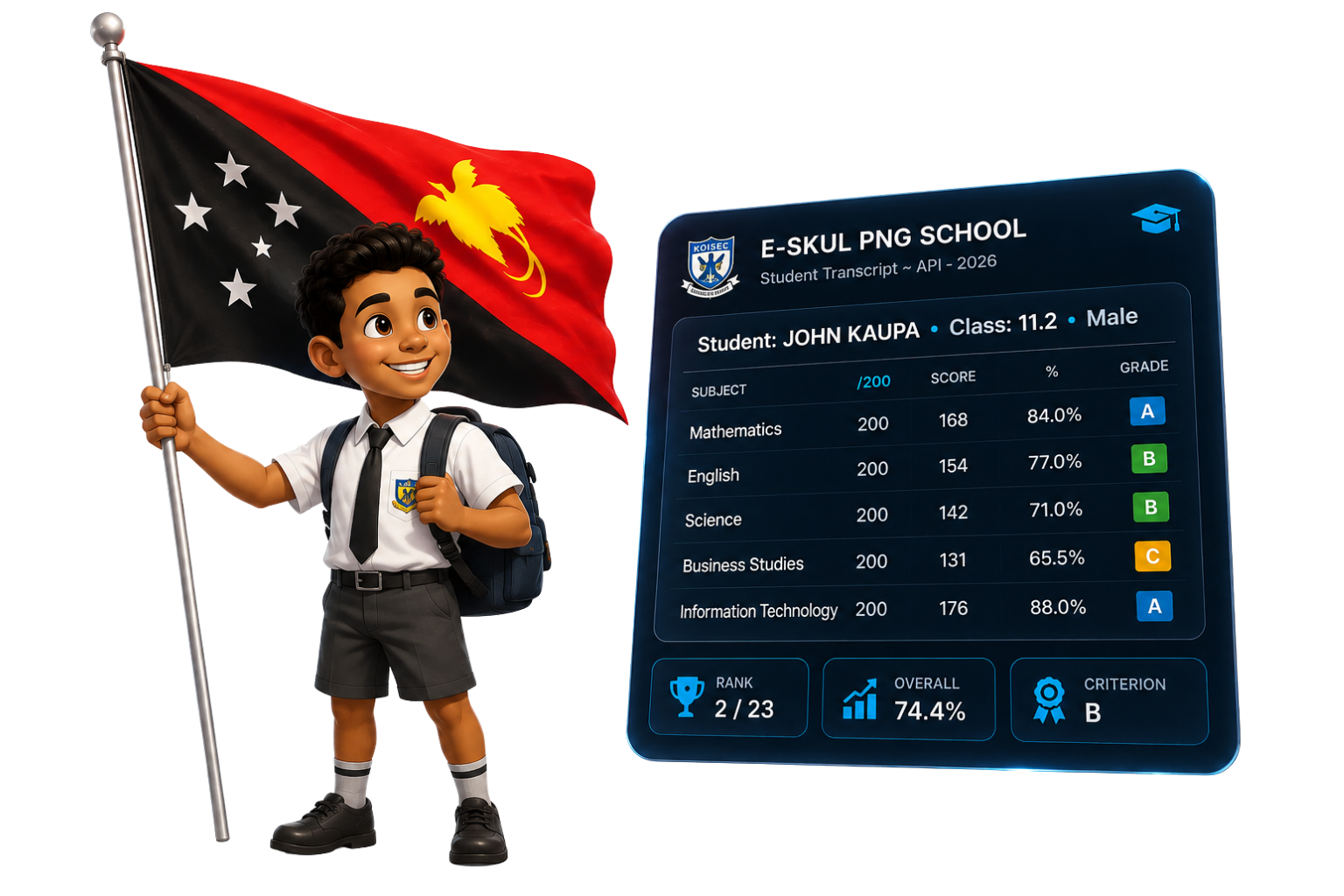
Type marks straight into a live spreadsheet-style grid — no separate save button, no page reloads. Every mark auto-saves the instant you tab or click to the next cell, and out-of-range values are caught immediately so a typo can't slip into a report card. Behind the scenes, e-skul PNG standardizes each subject to a score out of 200, applies your school's grading scale, and ranks every student against their whole grade cohort in real time. What used to take a HOD hours with a calculator and a spreadsheet now happens automatically as marks are typed.
Automated Report Cards
Instead of a teacher manually copying marks, comments, and evaluation scores onto a template for every student, e-skul PNG pulls it all together automatically. Once marks, comments, and evaluations are entered anywhere in the system, the teacher just picks a class and hits print — the platform compiles every student's subjects, grades, rank, comments, evaluation scores, and signatures into a clean, print-ready A4 report card with the school's own logo and branding. A job that used to take days at the end of term now takes minutes, for one student or an entire class at once.
Gate Attendance
Replace the sign-in book at the gate with a QR scan. Every student's ID card carries a unique QR code — the gatekeeper scans it and e-skul PNG logs them IN or OUT automatically, switching direction based on their last scan so there's nothing to select or write down. Every scan is timestamped and stored, giving the school an accurate, searchable attendance record without anyone touching a pen.
5 Staff Roles
Every login is scoped to exactly what that person needs to do — Admins see everything, HODs enter marks for their subjects, Teachers write comments and evaluations and edit bios for their classes, Gatekeepers scan IDs at the gate, and Secretaries manage bio data, payments, and receipts. Nobody has to hunt through menus that don't apply to them, and nobody can accidentally change data outside their responsibility — the system enforces it automatically.
Progress Dashboard
Instead of an HOD chasing every teacher individually to ask "have you finished your marks, comments, and evaluations?", one dashboard shows exactly how complete every class is — broken down by subject and assessment period, updating live as staff enter data. Bottlenecks are visible at a glance, so follow-ups happen before report card day, not during it.
Full Student Management
Every student gets one complete profile — bio data, full enrollment and class history, a running log of fee payments with receipts attached, and withdrawal/restoration tracking — instead of records scattered across paper files, spreadsheets, and folders. If a student leaves and comes back years later, their whole history is still there waiting, and teachers can review the complete picture from a single page instead of digging through archives.